

Does Google built-in Make the 2026 Mazda CX-5 Easier to Use around Kenosha, WI?
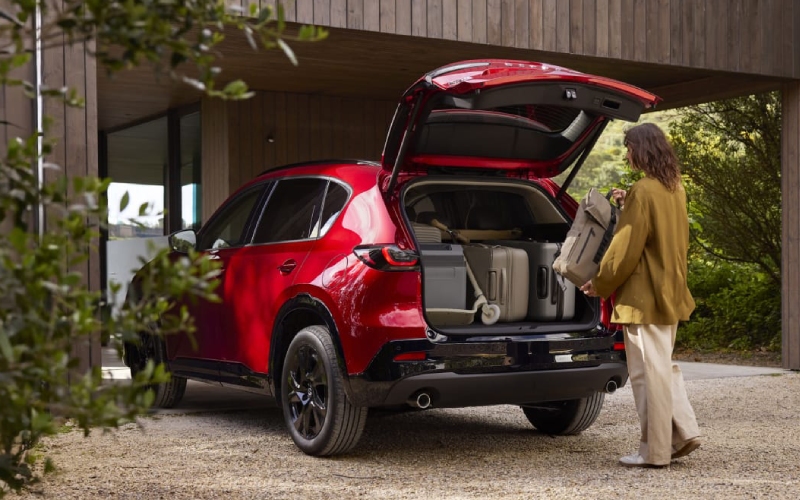
Russ Darrow Automotive Group – Does Google built-in Make the 2026 Mazda CX-5 Easier to Use around Kenosha, WI?
A smarter cabin can make every mile feel more manageable, especially when navigation, entertainment, voice control, and daily planning all work together naturally. For shoppers comparing compact SUVs, Google built into the all-new Mazda CX-5 is one of the most meaningful upgrades because it is designed to feel familiar from the start. Rather than forcing drivers to learn a complicated menu structure, Mazda pairs its largest-ever available touchscreen with connected Google services that many shoppers already use in everyday life.
This matters for drivers around Kenosha, WI, because local driving can involve a wide mix of needs in a single day. A routine might include commuting toward I-94, navigating downtown streets, finding a restaurant near the lakefront, checking traffic before heading north, or coordinating family stops after work. The available 15.6-inch integrated touchscreen with Google built-in helps bring those tasks into one easy-to-use interface, supporting a more confident and less distracting drive.
What Google built-in Means in the CX-5
Google built-in is designed to integrate key Google apps and services directly into the vehicle. Mazda notes that the system includes access to Google Maps, the Google Play Store, and upcoming support for Google Gemini, an AI assistant from Google. The available 15.6-inch integrated touchscreen serves as the hub for infotainment and connectivity, using smartphone-like usability and a customizable home screen so frequently used features are easier to reach.
For in-market shoppers, the benefit is not only the size of the display. It is the way the system is intended to work. Google Maps can provide fresh traffic and place information, which helps with route planning and local searches. When signed into a Google Account, the vehicle can access saved places and previous searches for a more personalized experience. That can be helpful if you regularly navigate to work, school, fitness centers, medical appointments, favorite restaurants, or weekend destinations.
Why the Available 15.6-inch Touchscreen Matters
Mazda calls the available 15.6-inch integrated touchscreen the largest ever offered on a Mazda vehicle. A larger screen can be easier to read at a glance, but Mazda’s goal goes beyond size. The system is designed around intuitive operation, with a customizable home screen that helps reduce the number of steps needed to access common features. This can be especially helpful when switching between navigation, audio, and vehicle settings.
The redesigned CX-5 cabin also supports the technology with a clean, uncluttered layout. Mazda describes the interior as calm and functional, allowing the driver to focus while passengers can relax. That pairing is important. A large display is most useful when the surrounding cabin makes it easy to understand and use. In the CX-5, the technology feels like part of a broader effort to create a more refined and user-friendly SUV.
How It Helps with Navigation and Daily Planning
Navigation is where GGoogle’sbuilt-in may make the biggest difference for many shoppers. Google Maps is familiar, fast, and useful for local searches. In the CX-5, it can help provide current traffic and place information, making route planning simpler. For Kenosha-area drivers who travel along I-94, head toward Milwaukee, visit neighboring communities, or take longer Wisconsin trips, reliable mapping can make the drive feel more predictable.
Personalization also adds value. If you sign into a Google Account, saved places and previous searches can become easier to access from the vehicle. Instead of repeatedly typing in the same locations, you can rely on familiar destinations already connected to your account. For busy households, that type of convenience can make the difference between a system that feels useful every day and one that gets ignored after the first week.
- Traffic awareness: Google Maps can support smarter route choices with fresh traffic information.
- Place search: Drivers can look for restaurants, shops, services, and destinations using familiar Google tools.
- Saved locations: Google Account sign-in can bring saved places and previous searches into the vehicle.
- Reduced learning curve: The interface is designed to feel similar to everyday digital tools.
These benefits are practical rather than flashy. The technology is not just there to impress during a showroom visit. It is meant to help with the small decisions drivers make constantly: which route to take, where to stop, how to find a saved destination, and how to keep useful information close without adding unnecessary complexity.
Voice Help with Google Gemini
Google Gemini is coming soon to cars with Google built-in, and Mazda highlights its ability to support more natural hands-free interaction. The idea is simple: instead of memorizing specific commands or phrases, owners will be able to speak more naturally, ask complex questions, and steer the conversation with follow-up questions. That can make in-vehicle voice assistance feel more conversational and less rigid.
For shoppers focused on safety and convenience, this is an important point. Hands-free technology is most helpful when it works the way people naturally communicate. If voice interaction can handle more detailed requests, the driver can keep attention on the road while still managing useful tasks. Combined with Mazda’s driver-focused design philosophy, this supports a cabin that is modern without feeling overwhelming.
How to Evaluate It During a Test Drive
A test drive is the best time to determine whether the system fits your habits. Do not only look at the screen while parked. Spend a few minutes using the home screen, route guidance, audio options, and voice functions where available. Notice whether the display is easy to read, whether the menu structure feels logical, and whether the screen placement works well from your normal driving position.
- Set a destination: Try a familiar local route and see how quickly Google Maps responds.
- Search for a place: Look up a restaurant, store, or service location you might actually visit.
- Review the home screen: Ask how customization works and which shortcuts can be prioritized.
- Check visibility: Make sure the display is easy to read from your preferred seat position.
- Ask about connected services: Review account sign-in, app access, and future update possibilities.
Russ Darrow Automotive Group can help shoppers review these features in person while serving Madison, Green Bay, and Kenosha. Our team can also explain how Google built-in fits alongside other CX-5 highlights, including the redesigned cabin, improved second-row space, expanded cargo area, standard i-Activ AWD, and the 2.5-liter SkyActiv-G powertrain.
Frequently Asked Questions:
Does Google built-in require a compatible connection?
Yes. Mazda notes that Google built-in requires an internet connection and a compatible operating system, and availability may vary by device, country, and language. During your visit, our team can help explain what is needed for setup and how to make the most of the system.
Can Google Maps use saved places in the CX-5?
When signed into a Google Account from the vehicle, owners can access saved places and previous searches. This can make navigation feel more personal and efficient, especially if you frequently drive to the same work, school, family, or recreational destinations.
Is the touchscreen the only reason to consider the redesigned CX-5?
No. The available 15.6-inch integrated touchscreen is a major highlight, but the redesigned CX-5 also offers a larger cabin, improved rear passenger comfort, a more useful cargo area, standard i-Activ AWD, evolved Kodo design, and a strong focus on safety and craftsmanship.
Why should technology matter when choosing a compact SUV?
Technology affects how easy an SUV is to live with every day. Navigation, voice assistance, app access, display clarity, and menu design all influence comfort and confidence. In the CX-5, Google built-in helps make the cabin feel connected, familiar, and ready for modern driving needs.
For shoppers asking whether Google built-in makes the all-new CX-5 easier to use, the answer comes through in the details. The system brings familiar mapping, connected apps, personalization, and more natural voice support into a cabin that Mazda redesigned for calm, practical use. If your next SUV needs to feel refined, smart, and easy to adapt to your routine, the CX-5 deserves a close look.










0 comment(s) so far on Does Google built-in Make the 2026 Mazda CX-5 Easier to Use around Kenosha, WI?